Relational Database Table Schema
The VC Hub system employs a shared table structure definition for four traditional relational databases: SQLite, SQL Server, PostgreSQL, and MySQL. This unified schema ensures consistent data management and simplifies integration across different database platforms.
By adopting a common structure, users can seamlessly switch between supported relational databases without needing to adjust their historical or event data configurations.
TagHistory
The Tag History Repository typically utilizes at least three distinct database tables
| Table Name | Description | Column References |
|---|---|---|
| ScadaProviderMapping | Registry of historical data source nodes and repository names, used to identify the origins of historical data. | ScadaTagMapping.ProviderId = ScadaProviderMapping.Id ScadaTagHistory.ProviderId = ScadaProviderMapping.Id ScadaTagHistory_X_X_X.ProviderId = ScadaProviderMapping.Id |
| ScadaTagMapping | Registry of historical data tags and tag value types, used to register tags and provide tag IDs. | ScadaTagHistory.TagId = ScadaTagMapping.Id ScadaTagHistory_X_X_X.TagId = ScadaTagMapping.Id |
| ScadaTagHistory | This table stores raw tag historical data. When the historical database configuration is set to non-partitioned mode, the data is saved in this table. | |
| ScadaTagHistory_{ProvideId}{PartitonSize}{DateKey} | This table stores raw tag historical data. When the historical database configuration is set to partitioned mode, the data is saved in this table. There will be multiple tables that fit this format depending on: ProviderId (ScadaProviderMapping.Id) PartitonSize(day、week、month、quarter、halfyear、year) DateKey(DateKey calculated based on the current time and partition size.) | |
| ScadaTagPreProcessed_{ProvideId}{WindowSize}{DateKey} | This table stores preprocessed data. When the historical repository configuration enables preprocessing, the raw data is stored in this table according to the preprocessing settings. Multiple tables may follow this format, depending on the specific configuration ProviderId(ScadaProviderMapping.Id) WindowSize (Historical database configuration) DateKey (Grouped by original data timestamp using the yyyyMM format) |
ScadaProviderMapping
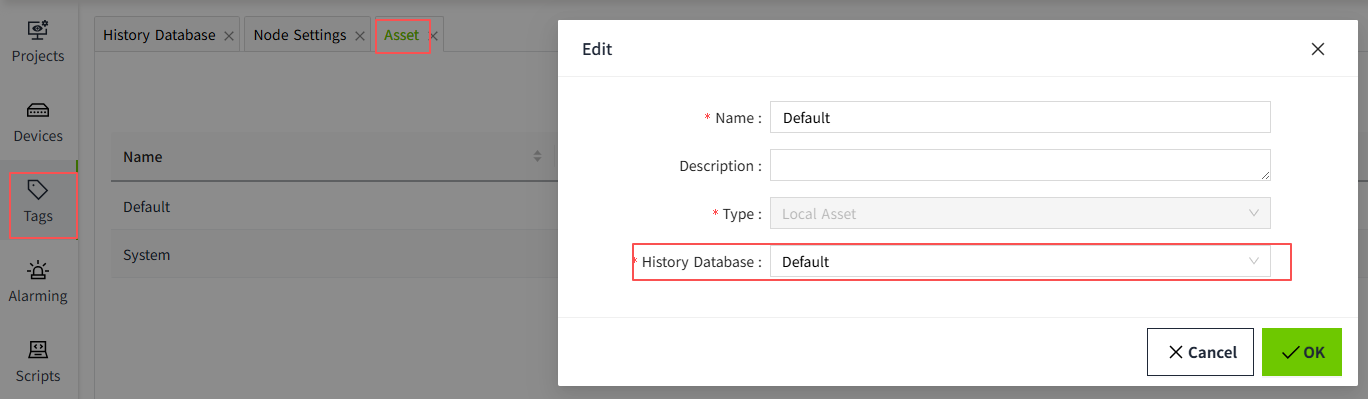
The tag is associated with an asset, and the asset is linked to a historical repository. The name of the historical repository, combined with the node name of the current historical data source, forms the structure of this table. A registry of historical data source node names and repository names is used to identify the origin of historical data.
| Column Name | Data Type | Description |
|---|---|---|
| Id | BigInt | Auto-incrementing ID. Referenced by the tables ScadaTagMapping, ScadaTagHistory, and ScadaTagHistory_X_X_X. |
| Node | String | Node name of the data source. |
| Provider | String | The name of the historical database bound to the asset. |
ScadaTagMapping
Registry of historical data tags and tag value types, used to register tags and provide tag IDs.
| Column Name | Data Type | Description |
|---|---|---|
| Id | BigInt | Auto-incrementing ID. Referenced by the tables ScadaTagHistory and ScadaTagHistory_X_X_X. |
| Tag | String | The name of tag |
| Type | TinyInt | Data type used for tag storage 1: Integer 2: String 3: Double 4: Boolean 5: DateTime |
| ProviderId | BigInt | Source of ScadaProviderMapping ID |
| NormalizedName | String | String After Tag Is Converted to Chinese Pinyin |
ScadaTagHistory
Raw Tag History Storage
When the historical database is configured without partitioning, all raw tag history data is stored in the table ScadaTagHistory.
When partitioning is enabled, the data is stored in dynamically generated tables following the naming convention:
ScadaTagHistory_{ProviderId}_ {PartitionSize}_{DateKey}
| Column Name | Data Type | Description |
|---|---|---|
| TagId | BigInt | Source of ScadaTagMapping 的 Id |
| ProviderId | BigInt | Source of ScadaProviderMapping 的 Id |
| Quality | Int | The value of Quality |
| IntegerVal | BigInt | If the tag’s data type is set to 1 (Integer) the system will store the tag’s value. Otherwise, the value will be set to Null. |
| DoubleVal | Double | If the tag’s data type is set to 3 (Double) the system will store the tag’s value. Otherwise, the value will be set to Null. |
| BoolVal | Boolean | If the tag’s data type is set to 4 (Boolean) the system will store the tag’s value. Otherwise, the value will be set to Null. |
| StringVal | String | If the tag’s data type is set to 2 (String) the system will store the tag’s value. Otherwise, the value will be set to Null. |
| DateTimeVal | DateTime | If the tag’s data type is set to 5 (DateTime) the system will store the tag’s value. Otherwise, the value will be set to Null. |
| Timestamp | BigInt | Timestamp(milliseconds) |
ScadaTagPreProcessed
When preprocessing is enabled in the historical database, the system performs preprocessing operations on raw data stored in either ScadaTagHistory or partitioned tables named ScadaTagHistory_{ProviderId}_ {PartitionSize}_{DateKey}.
Based on the configured preprocessing time window, timestamp, and data source, the system generates corresponding preprocessing tables using the following naming convention: ScadaTagPreProcessed_{ProviderId}_ {WindowSize}_{DateKey}
| Column Name | Data Type | Description |
|---|---|---|
| TagId | BigInt | Source of ScadaTagMapping 的 Id |
| Category | Int | Sampling Type 1: Min 2: Max 3: Avg - The IntegerVal column stores the count of data points, representing the total number of valid entries within a given time window or sampling period. - The DoubleVal column stores the average ( Avg) value calculated from those data points. 4: Last 5: First 7: Count 11: CountOn And CountOff - The IntegerVal column stores the CountOn value, representing the number of times a tag or signal transitioned to an "On" state within a defined time window.* - The DoubleVal column stores the CountOff value, indicating the number of transitions to the "Off" state during the same period 12: DurationOn And DurationOff - The IntegerVal column stores the DurationOn value, representing the total time (in seconds) that a tag or signal remained in the "On" state during a specified time window. - The DoubleVal column stores the DurationOff value, indicating the total time (in seconds) the tag was in the "Off" state within the same period.) |
| Timestamp | BigInt | When the preprocessing time window is set to 2 minutes, the system calculates the timestamp for each tag value using the following formula: Plain Text Timestamp = floor(TagTime / (2 × 60 × 2000)) × (2 × 60 × 2000) This formula aligns the tag’s original time to the start of its corresponding 2-minute window. For example, if the tag value falls within the time range from 2028-08-01 01:00:00 to 2028-08-01 01:02:00, the system assigns the timestamp 2028-08-01 01:00:00 to the preprocessed record. |
| Quality | Int | The value of Quality |
| IntegerVal | BigInt | - If the tag’s data type is set to 1 (Integer), the system stores the tag’s value; otherwise, the value is set to Null - When the sampling type is Avg, this column stores the number of raw data points collected during the sampling interval. - When the sampling type is Count, this column also stores the number of raw data points within the sampling interval. - When the sampling type is CountOn And CountOff, this column stores the CountOn value, representing the number of transitions to the "On" state. - When the sampling type is DurationOn And DurationOff, this column stores the DurationOn value, indicating the total time the tag remained in the "On" state. |
| DoubleVal | Double | - If the tag’s data type is set to 3 (Double), the system stores the tag’s value; otherwise, the value is set to Null. - When the sampling type is Avg, this column stores the average value of the raw data points collected during the sampling interval. - When the sampling type is CountOn And CountOff, this column stores the CountOff value, representing the number of transitions to the "Off" state.- When the sampling type is DurationOn And DurationOff, this column stores the DurationOff value, indicating the total time the tag remained in the "Off" state. |
| BoolVal | Boolean | If the tag’s data type is set to 4 (Boolean), the system stores the tag’s value. Otherwise, the value is set to Null. |
| StringVal | String | If the tag’s data type is set to 2 (String), the system stores the tag’s value. Otherwise, the value is set to Null. |
| DateTimeVal | DateTime | If the tag’s data type is set to 5 (DateTime), the system stores the tag’s value. Otherwise, the value is set to Null. |
| CollectTimestamp | BigInt | The record time reflects the timestamp associated with the data source for the current sampling type. If no specific record time is available from the data source, the system defaults to using the same value as the Timestamp field. |
Notes
ProviderId
The primary key ID of the ScadaProviderMapping table is used to uniquely identify each SCADA data provider configuration. In related tables such as ScadaTagHistory and ScadaTagMapping, this ID is represented as the field ProviderId, serving as a foreign key to establish relational integrity between tag records and their associated data providers.
WindowSize
The value configured for the preprocessing time window defines the sampling interval used during data preprocessing. It determines how raw historical data is grouped and aggregated over time. For example, if the time window is set to 2 minutes, the system will aggregate and process all tag values that fall within each 2-minute interval, producing one preprocessed record per window
Datekey
The partition key is calculated by applying the system’s partitioning rules to the timestamp of each historical data record. Depending on the partition type—such as daily, monthly, or hourly—the timestamp is transformed into a key that identifies the corresponding partition
| Partition Type | Calculate Rule |
|---|---|
| day | Historical tag values are recorded using UTC time formatted as yyyyMMdd. 20241105 |
| week | Weeks start on Monday. Week index is calculated from January 1st, starting at 1. 202445 |
| month | UTC time is formatted as yyyyMM. 202411 |
| quarter | UTC time is formatted as yyyyQ, where Q ranges from 1 to 4. 20244 |
| halfyear | UTC time is formatted as yyyyH, where H is 1 for the first half and 2 for the second. 20242 |
| year | UTC time is formatted as yyyy. 2024 |